Free Real Estate: GitHub Actions Runners on My Idle Cloudflare Container
Ephemeral GitHub Actions runners on Cloudflare Containers, a GitHub App, a pile of nested Docker, and one cleanup task accidentally scheduled for the year 57,000.

I was already paying for a Cloudflare Container running 24/7 for one of my apps. It sat there, mostly idle, sipping my money. Meanwhile every git push rented me a different computer, a GitHub-hosted runner, to run my CI for a few minutes and then throw away.
Two clouds. One of them loafing. It felt like leaving the oven on while ordering takeout.
So I built gh-runner-broker: a system that puts my idle Cloudflare capacity to work as a farm of throwaway GitHub Actions runners, shared across every repo I own. Here's how it works, why it's held together with genuinely cursed container tricks, and the four bugs that tried to stop me.
The 20-second version
- A Cloudflare Worker hears GitHub
workflow_jobwebhooks. For any job labeledcf-runner, it boots a throwaway container, runs that one job, and deletes it.- One GitHub App covers every repo in my account, no organization needed.
- It does Docker-in-Docker, so image-building jobs like
wrangler deployactually work.
Why not just use GitHub's runners?
You can. They're great. Two facts pushed me elsewhere.
I'm a person, not an organization. The clean way to share self-hosted runners across many repos is runner groups, an org- and enterprise-only feature (GitHub Docs). Personal accounts don't get them. My repos are just loose repos under one username.
I was already paying for the compute. Self-hosted runners don't touch your Actions minutes quota, they're free to use, you just bring your own hardware (GitHub Docs). My "hardware" was a Cloudflare account already on the Workers Paid plan.

So this was never about speed. It was about reusing leftovers. (Timely aside: in December 2025 GitHub floated charging a per-minute fee even on self-hosted runners, then walked it back after the internet did its thing, The Register. This project felt a little more righteous that week.)
How a "broker" works
The broker is a matchmaker. A GitHub App installed on my repos subscribes to one event, Workflow job, and fires a webhook at a Cloudflare Worker every time a job gets queued. The Worker decides whether to conjure a runner.
The whole thing is one TypeScript Worker. The path of a single job:
- 1. You label a job,
runs-on: [self-hosted, cf-runner](orcf-runner-dockerfor image builds). - 2. GitHub fires a webhook at
POST /webhook. - 3. The Worker checks your ID, it verifies the
X-Hub-Signature-256with a constant-time HMAC-SHA-256 comparison, so nobody forges a job or times their way in. - 4. It routes by label, docker vs. native vs. a polite "ignored."
- 5. It mints a one-shot token, authenticating as the App, it grabs a short-lived, per-repo token and calls
generate-jitconfig. - 6. A container wakes, runs the job, and dies.
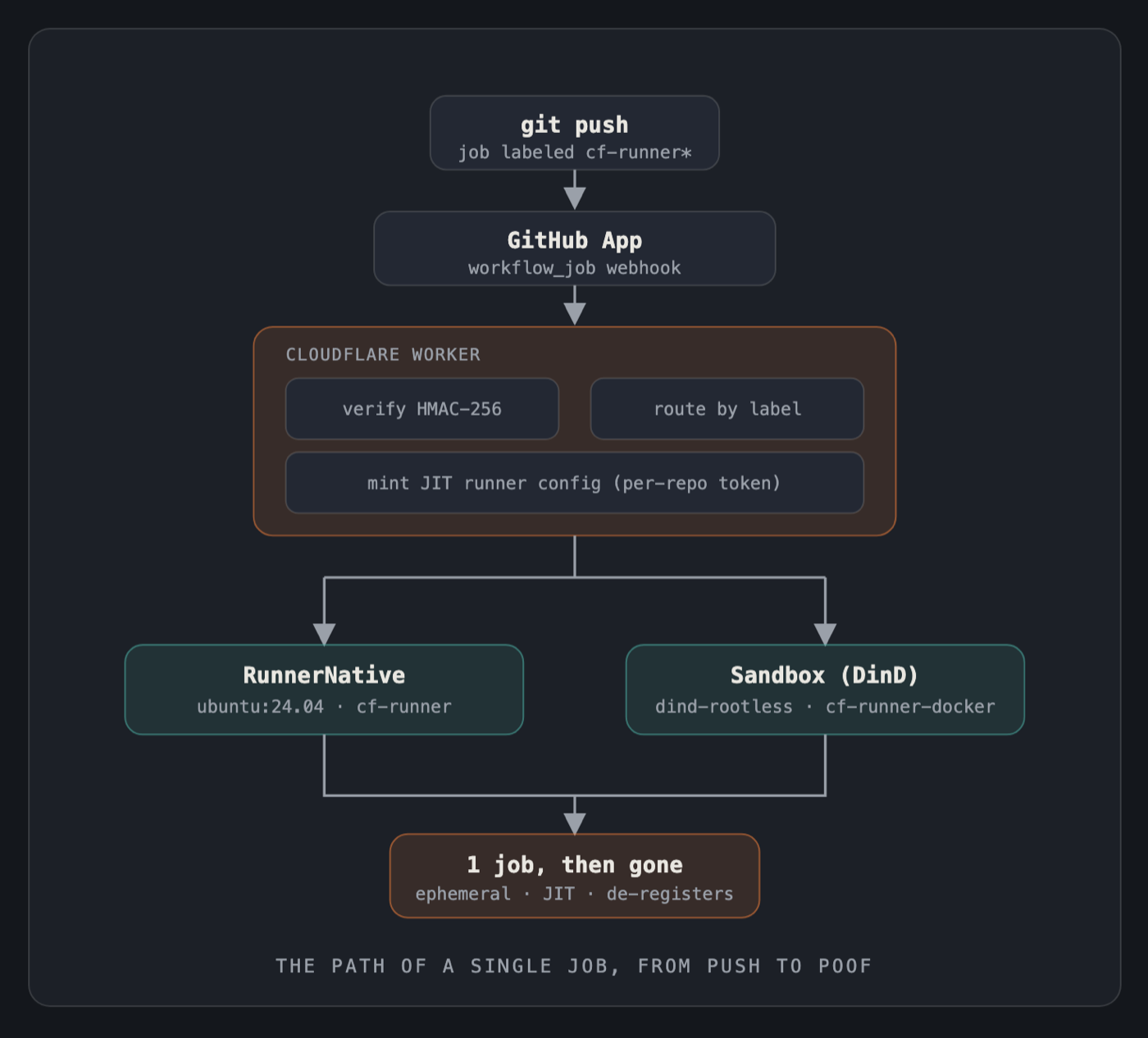
That last part is the trick. GitHub's just-in-time runners (shipped June 2023) run exactly one job, then de-register themselves. Born, one useful thing, gone, which is exactly how Cloudflare Containers already behave. No standing pool to babysit. No polling. A webhook only does work when there's work.
The cursed part: Docker inside Docker inside a cloud
One of my repos deploys itself with wrangler deploy, which builds a Docker image locally, Cloudflare has no remote build service, so the build has to happen on the runner. So my runner needs Docker. Inside a container. On Cloudflare's container platform. What could go wrong?

Everything, at first. Standard Cloudflare Containers run unprivileged, I confirmed it the hard way: CapEff: 0, no /dev/net/tun, no --privileged, no iptables. Rootless Docker wants network namespaces and tap devices; all blocked. A brick wall with "no" on every brick.
The escape hatch was Cloudflare's own Sandbox SDK, which added Docker-in-Docker on February 17, 2026 and went GA on April 13, 2026 (Cloudflare Changelog). The rules: rootless only, docker:dind-rootless base, iptables off, host networking on.
To make that painless I did something slightly gremlin-brained: I swapped the docker binary for a wrapper that auto-injects --network=host into every build and run, so even wrangler's internal docker build gets it for free. The real binary lives on as docker-real, doing the actual work like an understudy.
The Bug Hall of Fame
Every honest infra project has a graveyard of bugs that only appear after it looks done. Mine has four, and each is a tiny parable.

#1, The key that was the wrong kind of key. Web Crypto only accepts private keys as PKCS#8. GitHub hands you App keys as PKCS#1. My test fixture generated its own key as PKCS#8, so the test passed by testing the wrong thing. The fix: hand-build the PKCS#8 wrapper by prepending fourteen specific bytes of raw ASN.1. Cryptography!
#2, The cleanup scheduled for the year 57,000. To kill orphaned runners, the Worker schedules a "force stop" 20 minutes out. I wrote schedule(Date.now() + MAX_JOB_MS, ...). Turns out that API reads a plain number as seconds of delay. Date.now() plus 20 minutes is ~1.8 trillion. As seconds, that scheduled my cleanup roughly 57,000 years from now.

My safety net was, technically, going to fire, during a geological epoch that doesn't have a name yet. Passing a real Date fixed it.
#3, The runner that lost its timezone. The native runner refused to start on clean ubuntu:24.04: "Couldn't find a valid ICU package." Its installer hardcodes libicu60/57/55, none of which exist on 24.04, which ships libicu74. It was asking for a library by a name that retired years ago.
#4, The glibc Node that couldn't run on musl. On Alpine, actions/checkout died with fcntl64: symbol not found. The runner ships its own glibc-built Node, which can't run on musl. Fix: symlink its bundled Node to the system's musl Node, the software equivalent of quietly swapping a toy's batteries.
Every one of these surfaced after deploy, on real hardware. Your test suite is a dress rehearsal. Production is opening night, and opening night has opinions.
Wiring up the GitHub App
The nicest part: adding a repo to the fleet takes zero code changes. You install the App on it, label a job, done. Here's the one-time setup.

- 1. Create a GitHub App and grant three repository permissions: Administration: Read & write (this is the non-obvious one, registering self-hosted runners lives under Administration), Actions: Read-only (to even see the job event), and Metadata: Read-only (automatic).
- 2. Subscribe to the "Workflow job" event, that's the single webhook the whole system runs on.
- 3. Point the webhook at your Worker's
/webhookURL and set a webhook secret (the same one the Worker verifies against). - 4. Generate a private key. GitHub gives you PKCS#1, yes, the format from bug #1. Store it as a Worker secret, never in the repo.
- 5. Install the App on any repos you want in the fleet. Adding a seventh repo later? Just install; no redeploy.
Two prerequisites worth stating plainly: you need the Cloudflare Workers Paid plan (Containers aren't on the free tier), and local Docker running the first time you wrangler deploy, because that's what builds the runner images.
The snake that deploys itself
One last piece of paranoia. The broker deploys itself on every push to main, but that deploy job runs on a GitHub-hosted runner, not on its own cf-runner-docker.

Why? Survival. If a bad push broke the runner image and the broker needed its own runner to ship the fix, you'd be stuck: no working runner, no way to deploy the runner that fixes the runner. So the one job that must always work stays on infrastructure the broker doesn't control. Never saw off the branch you're sitting on.
So… was it worth it?
For pure ROI? GitHub's runners were the sensible call, and I'll say so plainly. But "sensible" and "satisfying" live on different axes.

What I got: one install-once GitHub App that turns any of my personal repos into a client of a shared, ephemeral runner farm, on compute I was already renting, with full Docker-in-Docker for the jobs that need it. No org, no standing servers, no idle-capacity guilt. And, for one glorious commit, a cleanup task scheduled for the year 57,000. Worth the trip.
FAQ
What's a self-hosted GitHub Actions runner? A machine you provide to run Actions jobs instead of GitHub's cloud runners. It's free to use and doesn't touch your minutes quota, you just pay for the compute. Here, that machine is a disposable Cloudflare Container.
Why a GitHub App instead of a personal access token? An App installs per-repo and issues short-lived, tightly-scoped tokens, far safer than a broad, long-lived PAT. It's also the only way to reach every repo in a personal account, since personal accounts can't use runner groups.
Can you really run Docker-in-Docker on Cloudflare? Yes, rootless only, via the Sandbox SDK (added Feb 17, 2026). Use the docker:dind-rootless image, disable iptables, use host networking. Privileged DinD isn't supported.
Built by Aman Jain. If you enjoyed watching a task get scheduled for the year 57,000, the source is on GitHub, the comments are the real documentation.
Sources (retrieved 2026-07-02)
- GitHub Docs, Managing access to self-hosted runners using groups, https://docs.github.com/en/actions/hosting-your-own-runners/managing-self-hosted-runners/managing-access-to-self-hosted-runners-using-groups
- GitHub Docs, About billing for GitHub Actions, https://docs.github.com/en/billing/managing-billing-for-github-actions/about-billing-for-github-actions
- GitHub Changelog, Just-in-time self-hosted runners (Jun 2, 2023), https://github.blog/changelog/2023-06-02-github-actions-just-in-time-self-hosted-runners/
- Cloudflare Changelog, Docker-in-Docker added to Containers & Sandboxes (Feb 17, 2026), https://developers.cloudflare.com/changelog/post/2026-02-17-docker-in-docker/
- Cloudflare Changelog, Containers & Sandboxes now GA (Apr 13, 2026), https://developers.cloudflare.com/changelog/post/2026-04-13-containers-sandbox-ga/
- Cloudflare Sandbox SDK, Run Docker-in-Docker, https://developers.cloudflare.com/sandbox/guides/docker-in-docker/
- The Register, GitHub to charge devs for using their own hardware (Dec 17, 2025), https://www.theregister.com/2025/12/17/github_charge_dev_own_hardware/